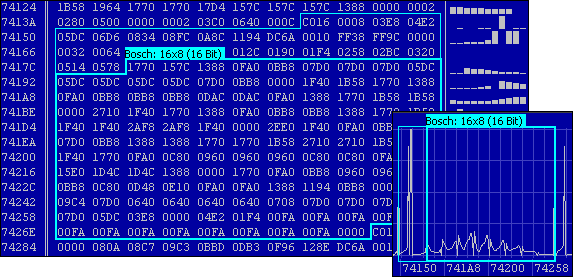
WinOLS is an application, which is written especially to modify the memory contents of ECUs.
It facilitates the searching and finding of maps, which can then be named and viewed in different ways and changed. To change the data, different functions are available to edit the maps.
All data and maps are stored in project files. These project files hold all information obtained in the course of processing of a given controller. Other information, such as customer name, car number, and image files can be added.
Modifications of maps can be stored as 'versions' and can be commented. Up to 200 versions of one original file are possible.
All modified projects are shown in a list, which can be filtered and sorted. So it is easy to find an already modified project again.
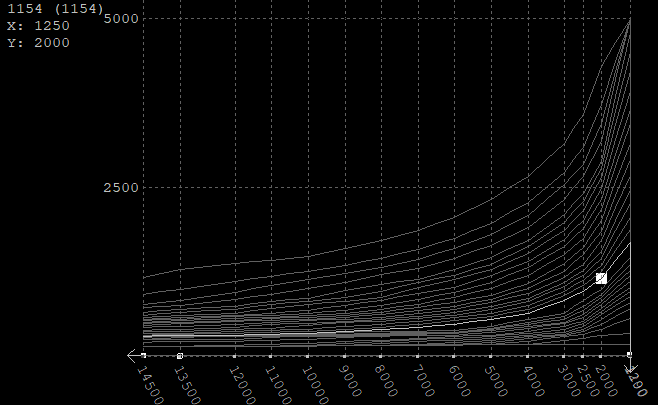
WinOLS 5.46 brings with "Slices" a new, alternative optical representation for maps. Here all lines are at the same height, which facilitates the comparison. With the toolbar view the display can be rotated+scaled.
Note: Slices are a "WinOLS Feature", i.e. they have to be unlocked by paying an annual fee.
Premium features
We will gradually introduce new,
Exciting features into WinOLS5. These new functions are activated once a year through premium features.
But even without Premium features, the software can be used for an unlimited period of time and you will receive bug fixes and detailed improvements. Only the new features marked as Premium Features that appear after the end of the year are not available without the purchase of Premium Features.
Show feature list
Unlock premium features
| Item number |
Description |
Number of workstations |
Price *) | Buy |
| OLS505 |
WinOLS5 |
1 |
€ 1034,11 | Please login |
| OLS505-Licence |
Additional license for OLS505 |
+12) | € 785,40 | Please login |
| OLS515-2 |
Premium features |
Price per place and year 1) | € 98,18 | Please login |
*) All prices quoted include 19% VAT. (Corporate customer? Please login!)
1) If your Premium features have been expired for more than one year, we will charge you per year (maximum: 3) for the features added in the meantime.
2) If your Premium features have expired or are about to expire, it may be cheaper for you to extend them before purchasing a new license.
Licensing
Additional licenses enables the usage in one company. All registered
computes must belong to one company. Only the employees of that
company are allowed to use them.
Strictly forbidden is the selling,
renting or passing of licenses, that means customer number and
password
Your license status
Please log in
The raw data is displayed either in 2D graphics or hex/decimal dump.
Automatic processor recognition to distinguish between program and data area.
Functions to search for maps and to put them down on the map list makes efficient working a lot easier.
A 3D preview window makes it easier to find maps
Maps can be shown as 3D/2D chart or as a table.
Automatic search of ECU and software numbers.
You can select either English or German as the interface language and switch between these.
Integrated checksum correction through plugins.
Support of current hardware like BDM100, BSL100 and OLS300.
Im- and export of binary files, Intel and Motorola-Hexfiles. All types can be zipped, coded and have swapped lines or be sent directly by mail.
- Text / 2d / 3d / Slices
- Automatic overview
- Automatic map search
- Extensive editing functions
- Many configuration options
- Many built-in import formats
- Export projects
- Use external hardware
- Let plugins calculate checksums
- Many import-plugins
- OLSx export / Mass export
- Scripts
- Clients
Map search:
The automatic map search finds maps and shows them in a list and also directly in the data:
Preview-Window:
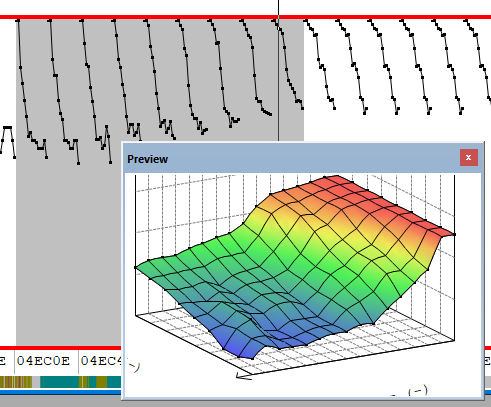
The preview window can be freely moved and sized and shows the selection as 3d-map:
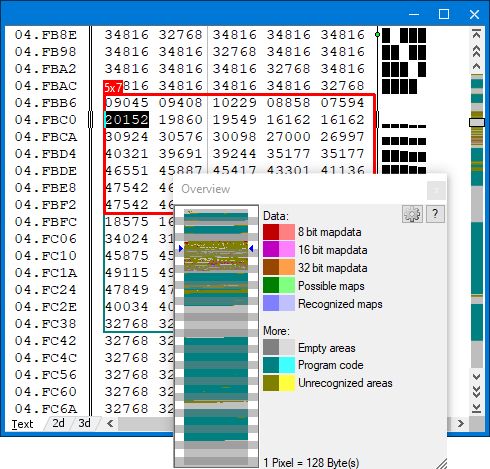
 Automatically overview:
Program code, empty areas, maps etc. are automatically detected. An overview window shows
what can be found where in the file. Program code and empty areas are automatically displayed in pale.
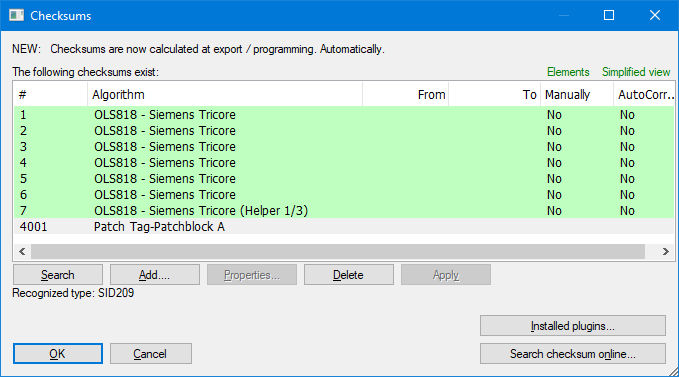
 Automatic checksums:
Each checksum module (available separately) automatically recognizes whether it can be used and corrects
the checksums immediately after each change. Even in real time while the car is running. If you don
have the right module yet, just press a button and all checksum modules for your project will be tested online. So you know for sure which one fits. Modules can be purchased online
around the clock. You will receive the module within minutes.
Digital signatures as watermarks
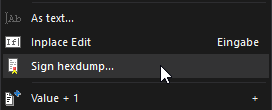 By making tiny changes to the data, you can digitally sign your projects to recognize copies.
Optionally openly visible to everyone or only to you. None of the text is visible in the data, but it can still be displayed.
By making tiny changes to the data, you can digitally sign your projects to recognize copies.
Optionally openly visible to everyone or only to you. None of the text is visible in the data, but it can still be displayed.
|
Free choice of colour:
There are four color schemes preset and of course you can configure your own colors individually.

- Original and version: For every project the original is stored permanently. Changes will be stored as version (the number of versions is not limited). Changes are displayed in
colour and you can restore the original values any time.
- Multilevel undo: Up to 50 editing steps can be undone.
- Scripts for pros: If you work with similar cars, you can store the changes as scripts. This allows you to apply the changes for every new car within seconds.
- Automatic comments: You can enter comments for every project and every version. Further more they are automatically commented when you import or create new versions.
- Online project search: Our online-database can automatically fill in the fields like producer, chassis, etc. Several other fields, like
Bosch number will even be filled in automatically when you're offline.
- Complete overview: The project overview shows all your projects in a configurable and searchable list. Within the fraction of a second, even if you have hundreds of projects.
- Versions: For every project you can create as many versions as like. The
version over shows which maps are changed in which version.
- Open for other projects: WinOLS can import and export binary data, Intel- and Motorola-Hexfiles. Entire maps and the map list can be exported to Microsoft Excel. Maps can be ex and
imported from a project.
- Accept changes: Copy the best changes from old projects. Even if the maps were moved to a different position, they will still be automatically recognized.
- Extensive help: Texts in the status bar, tool tips for the icons, Instructions for every dialog. WinOLS keeps you informed which every step. Furthermore you can download the entire documentation as PDF here.
- Many other features. Too many to list all of them here...
- WinOLS 5 requires Windows 10 (x64), Windows 11 (x64) or Windows 11 (ARM).
- WinOLS 5 supports current EVC hardware like UCM100, BDM100, BSL100, OLS300 (except under ARM). Megaprommer MP2240P and OLS16 are no longer supported.
- WinOLS 5 can be installed and used in parallel to WinOLS 4 and uses the same license, i.e. you do not need another license for a WinOLS 5 installation on a computer on which WinOLS 4 is already installed. Since WinOLS5 can save additional data fields and properties in projects, the project files are no longer backwards-compatible, i.e. projects that were created or modified with WinOLS5 can no longer be opened in WinOLS4.